Machine Learning for Additive Manufacturing
Creating a machine learning classification algorithm for additive manufacturing using MATLAB
Part of my final year thesis for completion of my Bachelor in Mechanical Engineering at the University of Warwick. I Worked with Dmitry Isakov, Research Fellow at the University of Oxford, and I obtained an 87% on the project. I then was offered a position as student researcher.
Abstract
Methodology and analysis of the development of a software and a machine learning (ML) algorithm for image extraction and classification of a Selective Laser Melting (SLM) additive manufacturing (AM) process is presented. The programmes were created by means of the MATLAB R2020b software package and the video of the surface of the powder bed of the SLM printer was captured using the XirisTM XVC-1100 smart camera. For all frames of the video captured, mean b* colour values were obtained and compared, identifying the precise frames required for analysis. An accuracy of 99% was achieved, proving the aptness of the software for Laser-Powder Bed Fusion layer-wise quality monitoring. Thereafter, a Bag of Visual Words (BoVW) ML algorithm was trained using the collected frames, which was subsequently tested, achieving a 92.1% accuracy. Several validation techniques were utilised, confirming software integrity. Finally, the impact of the developed programmes was outlined, focusing on their significance for research and evaluation of the effect of AM process parameters in print quality, and the opportunities for implementation in real-time AM quality monitoring systems.
The Code
Code for image database collection
Figure 1: Flowchart of process carried out
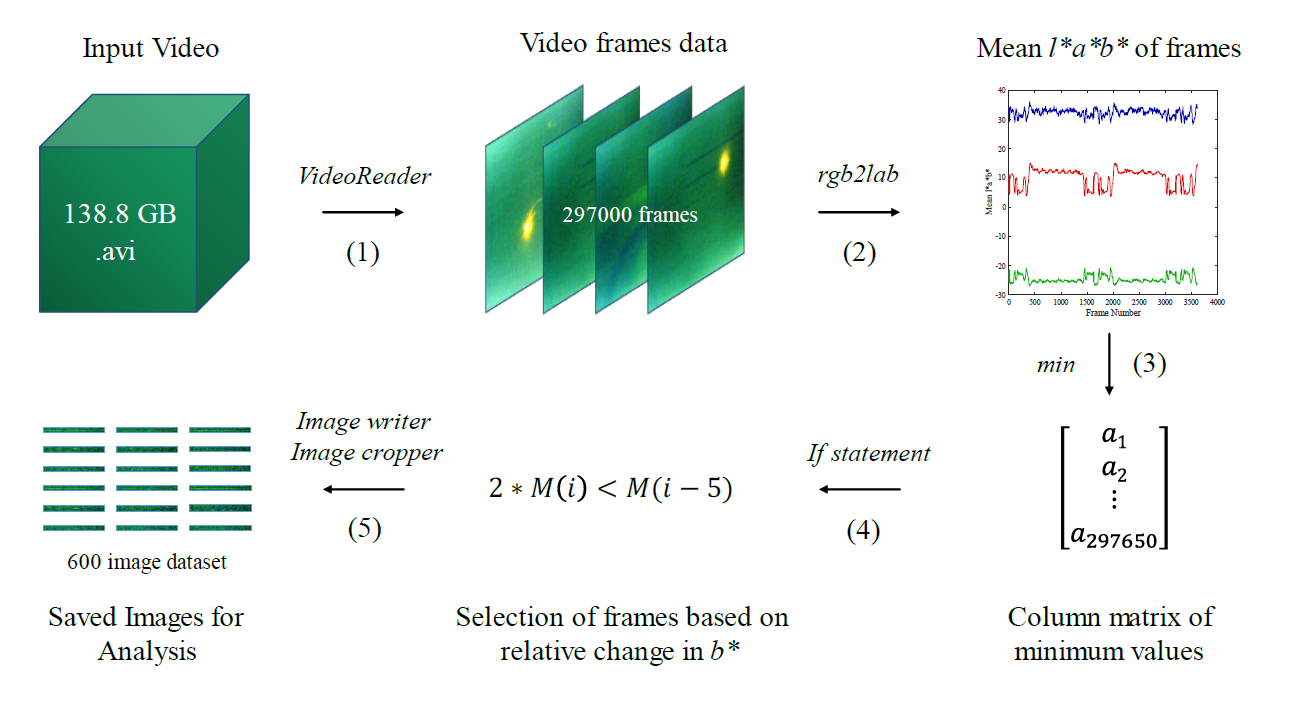
Read video and initialise variables.
% Reading video
v = VideoReader('FullVideo.avi');
% Obtain number of frames in video
NumOfFrames = v.NumFrames;

% Set Up matrices
meanB = zeros(NumOfFrames, 1); % Matrix containing mean b* values
mean50B = zeros(50,1); % Matrix containing mean b* values of past 50 frames
minimum = zeros(NumOfFrames-50, 1); % Matrix containing minium values of past 50 frames
Identifying frames based on mean b* values.

% Initial for loop to obtain Mean b* of all frames
for frame = 1:NumOfFrames
  thisFrame = read(v,frame);
  cform = makecform('srgb2lab'); % Change frame from rgb to lab colour space
  LabFrame = applycform(im2double(thisFrame),cform);
  meanB(frame) = mean2(LabFrame(:,:,3)); % Obtain mean b* value
end

% For loop to obtain array of minimum values
for i = 1:(NumOfFrames - 50)
  mean50B = meanB(i:i+50);
  minimum(i) = min(mean50B); % Minimum value os past 50 frames mean b*
end

% For loop to write and compare mininum
for j = 7:(NumOfFrames-50)
    if minimum(j) < (minimum(j-6)/2) % Compare minimum values of current frame and 6th frame prior
      outputBaseFileName = sprintf('Frame %4.4d.png', (j+44)); % File name based on frame number
      outputFullFileName = fullfile('D:\', 'frames', outputBaseFileName); % Folder to save frames in
      Frame = read(v,j+44); % Read frame
      imwrite(Frame, outputFullFileName); % Save frame in folder indicated above
    end
end
Delete files from same cycle that are unnecessary.
d = dir('D:\frames\Not valuable frames'); % Access folder
filenames = {d.name};% Access all filenames
Pnum = 00; % Define variable for previous file number

for i = 1:numel(filenames)
  fn = filenames{i}; % Access file name of specific file
  % Find all files that contain space and find first 2 digits of frame
  [num, cnt] = sscanf(fn(find(fn == ' ', 1, 'last')+1:end-6), '%d');
  % If statement to delete files with the same first 2 digits
  if cnt == 1 && isequal(num,Pnum)
    delete(fullfile('D:\frames\Not valuable frames', fn));
  end
  Pnum = num;
end
Manually select coordinates for image cropping
% h = imshow('Frame 0431.png'); % Show first frame saved
hp = impixelinfo; % Show location of pointer in frame
set(hp,'Position',[5 1 300 20]); % Position of information of location
Save cropped images
d2 = dir('D:\frames') % Establis folder to analyse
filenames = {d2.name}; % Find all filenames in the folder

% For loop to save cropped images
for i = 3: numel(filenames) % For all files
fn = filenames{iB; % Get current file number
I = imread(fn); % Read frame of current file
P1 = imcrop(I,[435 342 760 60]); % Crop frame for Sample 1 coordinates
P2 = imcrop(I,[435 465 760 60]); % Crop frame for Sample 2 coordinates
P3 = imcrop(I,[411 663 760 60]); % Crop frame for Sample 3 coordinates

% Save cropped images to desired folder and with desired name, S1,S2,S3
outputBaseFileName = sprintf('P1 %12s.png', fn);
outputFullFileName = fullfile('D:\S1', outputBaseFileName);
imwrite(P1, outputFullFileName);
outputBaseFileName = sprintf('P2 %12s.png', fn);
outputFullFileName = fullfile('D:\S2',outputBaseFileName);
imwrite(P2, outputFullFileName);
outputBaseFileName = sprintf('P3 %12s.png', fn);
outputFullFileName = fullfile('D:\S3', outputBaseFileName);
imwrite(P3, outputFullFileName);
end
Published with MATLAB® R2020b
Code for Image Classification
Figure 2: Flowchart of process carried out
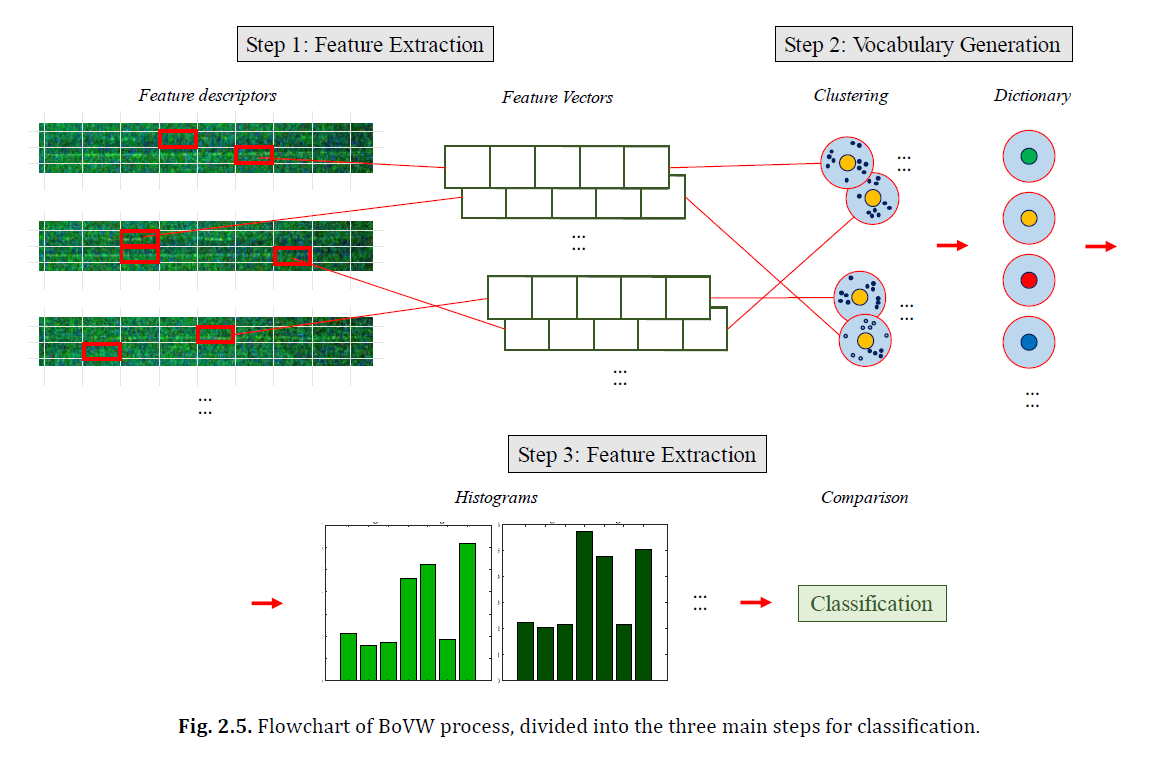
Establish datasets using ImageDataStore function.
File = fullfile('C:\Training and Test Set');
DB = imageDatastore(File,'IncludeSubfolders', true, 'LabelSource','foldernames');
Display class names and counts.
Table = countEachLabel(DB)
Categories = tbl.Label;
Partition 336 images for training and 228 for testing.
Ilocation = fileparts(DB.Files{1});
imgSet = imageSet(strcat(Ilocation,'\..'),'recursive'); % Recursively scan entire image set folder
[training_set,test_set] = imgSet.partition(113); % Create training and test set
test_set = test_set.partition(76)
Create visual vocabulary.
tic % Start timer
% Use bagOfFeatures function to create vocabulary
% Set vocabulary size, type of feature point selection
% and amount of features to select from (Final was 7, grid, 80%)
BoVW = bagOfFeatures(training_set, 'VocabularySize',7,'PointSelection','Grid','StrongestFeatures', 0.8);
% Create array of presence of visual words on each image
imgdata = double(encode(BoVW, tr_set));
toc % Stop timer
return; % Stop running code
Visualise/Plot histograms of feature vectors.
% Plot histogram of random S1 image
img = read(training_set(1), randi(training_set(1).Count));
featureVector = encode(BoVW, img); % Encode data from BoVW
subplot(1,3,1); % Establish 1x3 image
bS1 = bar(featureVector, 'FaceColor', [0 0.7 0]);
titS1 = title({'Visual Word Occurrences of','Image in S1 Training Set'});
xlabS1 = xlabel('Visual Word Index');
ylabS1 = ylabel('Frequency ()');

% Set font and size
set(gca, 'FontName', 'Times New Roman')
set([xlabS1,ylabS1], 'FontSize', 13)
set([titS1], 'FontSize', 15)

% Plot histogram of random S2 image
img = read(tr_set(2), randi(tr_set(2).Count));
featureVector = encode(BoVW, img);
subplot(1,3,2);
bS2 = bar(featureVector, 'FaceColor', [0 0.5 0]);
titS2 = title({'Visual Word Occurrences of','Image in S2 Training Set'});
xlabS2 = xlabel('Visual Word Index');
ylabS2 = ylabel('Frequency (%)');

% Set font and size
set(gca, 'FontName', 'Times New Roman')
set([xlabS2,ylabS2], 'FontSize', 13)
set([titS2], 'FontSize', 15)

% Plot histogram of random S3 image
img = read(tr_set(3), randi(tr_set(3).Count));
featureVector = encode(BoVW, img);
subplot(1,3,3);
bS3 = bar(featureVector, 'FaceColor', [0 0.3 0]);
titS3 = title({'Visual Word Occurrences of','Image in S3 Training Set'});
xlabS3 = xlabel('Visual Word Index');
ylabS3 = ylabel('Frequency (%)');

% Set font and size
set(gca, 'FontName', 'Times New Roman')
set([xlabS3,ylabS3], 'FontSize', 13)
set([titS3], 'FontSize', 15)
Create a 339x8 table using the encoded features
ImageData = array2table(imgdata); % Convert array created earlier to table
% Link each category with each feature vector
Type = categorical(repelem({training_set.Description}', [training_set.Count], 1));
ImageData.Type = Type;
Use the image data to train a model and assess its performance using Classification learner Open Classification Learner and import trained model
classificationLearnerTest out accuracy on testing set
tic % Start timer
testImData = double(encode(BoVW, test_set));
testImData = array2table(testImData,'VariableNames',M0780.RequiredVariables); % Implement imported model
actualImType = categorical(repelem({test_set.Description}', [test_set.Count], 1)); % Obtain actual category

predictedOutcome = M0780.predictFcn(testImData); % Implement imported model M0780 to test

% Count correct predictions by comparing obtained classification and actual category
correctPredictions = (predictedOutcome == actualImType);
validationAccuracy = sum(correctPredictions)/length(predictedOutcome) % Calculate validation accuracy
toc % Stop timer
Published with MATLAB® R2020b